It’s really useful to understand technical SEO definitions so you know what technical issues must be checked on your website.
Some of these issues can be checked and resolved by website owners building their own websites. Others are more complicated and are best looked at by a professional web designer. However, you should know what these mean so you know what to ask about!
404 Error
The 404 Not Found HTTP status code means the website couldn’t find the requested page or resource. This means the page link is broken or has been deleted, or just can’t be found. 404 errors are bad for SEO as they create a bad user experience because the page they want to visit doesn’t exist. Google doesn’t like them for the same reason.
Bounce Rate
The bounce rate is the percentage of visitors that take no further action after landing on a website, like clicking to a different page, commenting, or adding an item to their cart. In other words – they land on the website and then bounce off. A high bounce rate is bad for SEO because it shows Google that your visitors were not interested in the content you displayed, and they left your website.
Broken Link
A broken link is a link on a web page that points to a non-existent (or “dead”) page or resource. Broken links can internal (a link to another page on your site) or external (a link to another website). These are bad for SEO and should be fixed.
Content Delivery Network (CDN)
This is a globally distributed server network that makes it quicker for users to access your website (eg: Cloudflare). These services are one of the ways to speed up your website and decrease your page load time. They are excellent for SEO If they’re implemented correctly.
Core Web Vitals
These are metrics that form part of Google’s Page Experience signals and they are used to measure user experience. (This is quite a technical element of SEO and best handled and checked by a professional.) You need good results here for your pages to rank highly.
HTTPS
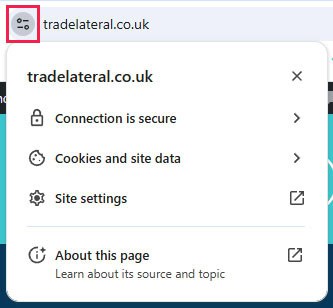
HTTPS is the encrypted version of HTTP. It protects the communications between your browser and server from being intercepted and tampered with by attackers. In order to activate this on your website, your web host will need to install a SSL certificate for you to prove that your website is secure. Once it is installed and activated correctly, you should see the change in the browser address bar. This used to show a small lock icon, but the icon has changed over time. It now looks like this if you click on it:
Page Speed
This is the amount of time it takes for your web page to load. It’s critically important to make your website load as fast as possible to ensure the best user experience for your visitors. No one wants a slow website. If your web page is too slow, users will click off it and search engines will interpret that as your page is not useful and will likely decrease its search ranking. Test yuor site using both GTMetrix and n Google’s PageSpeed Insights.
Permalink
This is a permanent, static, hyperlink to a particular web page or entry in a blog. (If you ever change these on a live website, you’ll need to carefully redirect your URLs.)
Redirects
A URL redirect is a way to send users and search engines to a different URL than the one they requested. (i.e. they click the link www.yourdomain.com/page and your site redirects them automatically to www.yourdomain.com/interestingpage instead. Redirects are used to move a webpage to a new address. They ensure that visitors and search engines are automatically taken to the correct page. There are many types of redirects, and they are used in different scenarios. (If you’re not a professional web designer, you might not need to know what types there are.)
Website Structure
This refers to how a website is organized and how its web pages are interlinked. Website structure is very important to SEO. Websites should have a hierarchical structure – their most important keywords should be at the top of the metaphorical pyramid, and the less important keywords should branch down from there.
Please use these links to learn more about SEO definitions like:
If there are any more Technical SEO definitions or terms that you still don’t understand, please ask us. We’ll answer all your questions!